Featured Post

We've moved to tex.my!

It’s been great writing on Blogger.com, but we’ve decided to move to a new platform, thanks to some valuable help from a great, great friend...

Monday, May 21, 2012

A New LaTeX User’s Testimonial

Last week I received an e-mail from Bahareh Pahlevanzadeh, a graduate student at Universiti Sains Malaysia, describing her happiness at discovering LaTeX and my usmthesis class/template for writing her thesis.

Your mileage may vary, but I was a bit surprised when she expressed her opinion that

When it comes to getting my writing organised, I found LaTeX, especially with the USMthesis class template, to be actually very user-friendly.

Well I don’t know about you, but I think I can count on one hand the number of times I’ve heard/read in person the words “very user-friendly” being used to describe LaTeX!

You can read more about Bahareh’s experience here.

Saturday, May 12, 2012

Apple's Keynote Beamer Themes for The Poor

If you don't have Keynote in your Mac, or does not even own any Apple's hardware, perhaps considering this theme, click here


Tuesday, April 24, 2012

LaTeX Template Website

Just read from an article here regarding Vel's effort on putting template on a single page. You can check out Vel's initiative from this page.

Tuesday, April 17, 2012

TeX4ht Options

CV Radhakrishnan (CVR) has posted a list of TeX4ht options, the most comprehensive I have seen yet.

TeX4ht is a very powerful piece of software for converting LaTeX to other formats, such as (X)HTML and ODT. Unfortunately, the documentation was never truly complete, and the inner workings of the system can be hard to grasp and understand. The original creator, Eitan Gurari passed on unexpectedly in 2009. CVR and Karl Berry has since taken over the maintenance of TeX4ht.

As a side note, if you have an existing LaTeX document that you need to convert to other formats, TeX4ht is the most robust system that I have come across, i.e. it works with almost any LaTeX packages that are used in your document. (See this link for other LaTeX-to-whatever conversion tools.)

On the other hand, if you’re just starting to write your document from scratch, with a view to exporting to different output formats later, you might be better off using DocBook or pandoc instead. I personally prefer the markdown syntax in pandoc and exporting to LaTeX later for further editing.

Saturday, March 24, 2012

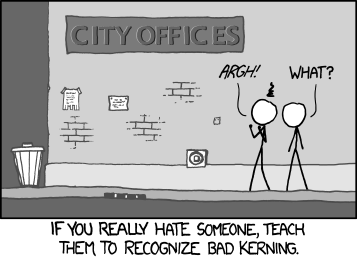
Reaction to Bad Kerning

Methinks this is one syndrome likely to afflict LaTeX users as well as designers. Everyone who’ve felt this way whenever you see a badly kerned sign, say “Aye”!


Saturday, March 17, 2012

Working collaboratively.. which one you prefer?

I found out this website, perhaps from an event organizer whom advising on the usage of MS Word over LaTeX.

Perhaps somebody out there could point out if there is any business entity that does the same business but in the other way around - using LaTeX


Converting an EndNote Database to BibTeX

During a recent LaTeX introductory workshop, many participants said that they’re very much looking forward to using LaTeX for their future writings, but mentioned that there didn’nt seem to be an obvious way of porting their existing EndNote bibliography libarary into BibTeX format.

EndNote does have an “Export BibTeX” filter, but it doesn’t seem to generate satisfactory BibTeX files. After some googling, I found Bevan Weir’s customised export filter, which does a much better job than EndNote’s default. I modified his filter file a little bit more, and was able to convert an EndNote bibliography library to BibTeX with the following steps.

I tested this with EndNote X5 on the Mac, with JabRef 2.7, but they should also work with Windows versions. %ENDNOTE% refers to the path where EndNote is installed on your system.

  1. Put BibTeX_Export_LLT.ens (download) in %ENDNOTE%/Styles/ .
  2. Start EndNotes, and load your library.
  3. Make sure the new style is listed:
    Edit > Output Styles > Open Style Manager
    Make sure BibTeX_Export_LLT is checked.
  4. File > Export
    Make sure Save File as Type is set to Text Only, and Output Style is set to BibTeX_Export_LLT.
  5. Save your file and check that it has a .bib extension.
  6. Open the exported .bib in JabRef. There will be a whole bunch of errors about corrupted or empty BibTeX keys; don’t worry. Just click OK.
  7. Ctrl+A to select all the BibTeX entreis, Tools > Autogenerate BibTeX keys.
  8. Check through the BibTeX entries, especially those highlighted red, to check and correct any crucial information loss.

And hopefully the converted bibliography file is now usable enough.