Featured Post

We've moved to tex.my!

It’s been great writing on Blogger.com, but we’ve decided to move to a new platform, thanks to some valuable help from a great, great friend...

Tuesday, July 23, 2013

A Light Colour Theme for Beamer Poster

(Yes it’s been a while. I’ve started working and adapting to the new pace!)

So quite a (long) while ago, I posted my sample beamer poster, while preparing for a conference poster. Now I’ve got another poster to present, and the previous colour schemes just did not go well with the logos. Hence I started tinkering around with the colours, and finally settled on this light, subtle palette:

Blown_Entrepreneur
Color by COLOURlovers.

The sample poster looks like these (shown together with the existing two other colour themes):


And here’s a thumbnail of the actual poster:


Source code of the sample files (including Beamer themes and colours) can be downloaded here.

Thursday, April 25, 2013

Sunday, March 24, 2013

WriteLaTeX - cloud based LaTeX compiler/editor

I found out this online service. Anyone is currently using it? Please drop your comment here.
I currently still prefers github for LaTeX collaboration - or mercurial, subversion. 

But somehow you may have specific reason for using any cloud based LaTeX editor/collaboration service.

Tuesday, January 22, 2013

Extracting Only Cited Bibliography Entries

Occasionally, while exchanging files with collaborators or submitting articles, I’d like to extract a smaller .bib file from my main, “hold-all” bibliography file, i.e. containing only the entries that I’d actually cited in my document.

Fortunately this can be done fairly automatically using the bibexport tool. Quick rundown:
  1. Compile your document, say myarticle.tex the usual way, with your “big” allrefs.bib file.
  2. Run bibexport with the following:
    bibexport -o extracted.bib myarticle
    extracted.bib should now contain only the bibliography entries that were cited in myarticle.tex.
  3. Change \bibliography{allrefs.bib} to \bibliography{extracted.bib} in myarticle.tex.
  4. Send myarticle.tex and extracted.bib to collaborator or editor!

Thursday, December 6, 2012

tlmgr and Debian variants

It's quite frustrating knowing that your working Linux distro does not have tlmgr and needs you to install the vanilla TexLive instead, as discussed here

It should be as easy as Python's easy_install and Ruby's gem install way..

Tuesday, December 4, 2012

Transcribing Doodled Equations to LaTeX (and MathML)

Here’s another useful website to bookmark: Web Equations lets you doodle a mathematical equation, then transcribes it into LaTeX or MathML. And it’s fast, too!

Sunday, December 2, 2012

Quick Diagrams with SmartDiagrams

It all started with a question on TeX.SX: Namely, is there any quick way to draw diagrams from a list of items, similar to the ‘Smart Art’ feature in PowerPoint 2010?

It wasn’t long before the package smartdiagram was born as a response, using TikZ to do the actual drawings. The basic syntax is:

\usepackage{smartdiagram}
\smartdiagram[diagram type]{list of comma-separated items}

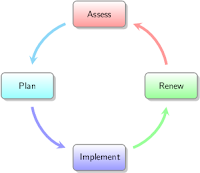
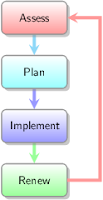
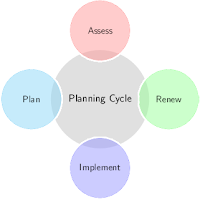
Here are some examples (based on material from here):

\smartdiagram[circular diagram]{Assess,Plan,Implement,Renew}

\smartdiagram[flow diagram]{Assess,Plan,Implement,Renew}
\smartdiagram[buggle diagram]{Planning Cycle,Assess,Plan,Implement,Renew}

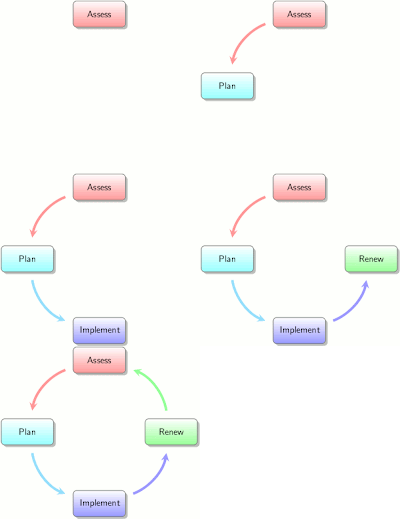
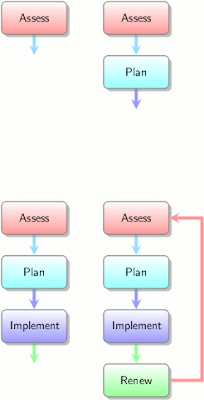
If you happen to be preparing a Beamer presentation, replacing the \smartdiagram command with \smartdiagramanimated will result in an automatically ‘animated’ diagram, with each item in the list appearing one at a time as you advance through the slides:

See the manual for other digram types and customisation options (colours, shapes, sizes, etc).