It’s been great writing on Blogger.com, but we’ve decided to move to a new platform, thanks to some valuable help from a great, great friend. (More shall be revealed about this kind soul – he’s a familiar/famous character in the TeX community!)
Thank you for reading LaTeX-my.blogspot.com – if you’re interested in following our new posts, please go on to (and bookmark) TeX.my. We’re still “moving in”, so there’ll likely be some re-decorations, but new posts (as well as all old posts and comments) will appear there from now on. Expect new layouts (automatic syntax highlighting wheee!); a new feature or two; and guest posts!
See you there!
Wednesday, March 23, 2016

Thursday, March 3, 2016
USMThesis Updated (Again)
Following the most recent feedback from the Main Campus, USMThesis has been updated to v1.6.3 today. The changes this time are in usmthesis.tex, where the List of Publications is moved after the appendices (so now Main Campus and Engineering Campus are on the same page now!) Pun unintended.
Looking at the ChangeLog, usmthesis v0.1 was Nov 2005 — so it’s been 10 years!! In fact if anyone wants to host a meetup/talk or something, ping me.
Friday, February 19, 2016
USMThesis Updated
USMThesis has been updated to v1.6.2, following feedback from IPS that the page numbering of appendices should be turned off in the table of contents.
If you already have the template (v1.6.1) from September 2015 and don’t want to re-download the template again now, just add these lines before \appendix in your thesis.tex:
\addtocontents{toc}{\protect\cftpagenumbersoff{part}}
\addtocontents{toc}{\protect\cftpagenumbersoff{chapter}}
Also, from recent feedback, it looks like Main Campus-IPS requires the List of Publications before the abstracts; while the Engineering Campus IPS requires the List of Publications after the appendices. So do check with IPS of your respective campuses before you print your entire thesis!
Another thing — when printing out the PDF, do remember to set paper size to A4, and Scaling to 100% or None in the Print dialog. Many PDF viewer applications would set it to 92% or Fit on page by default, and then the font sizes would come out too small and the page margins too wide!
Thursday, February 11, 2016

Wednesday, December 30, 2015
Source code for "LaTeX: More than just academic papers & theses"
I’ve posted the source code for my presentation LaTeX: More Than Just Academic Papers and Theses as an example on Overleaf.

Enjoy!
Saturday, December 26, 2015
LaTeX Cookbook and Beginner's Guide ebooks at $5 Each
Until January 6, that is!


Both books are written by Stefan Kottwitz. The LaTeX Beginner's Guide came out in 2011, and I still consider it as a very valuable book to newcomers — e.g. a useful tome to assign your new research student as prerequisite research-skills reading. (You can read my review of it here) (whoa where did I find the energy to write such long form back in the day?!)
The LaTeX Cookbook is actually still quite new, having been published just a couple of months ago in October. (Which makes this deal even more amazing, especially with the currency situation in this part of the world right now…) Anyway! amazing deal or no amazing deal, this book is another one in the “keeper’s” category. Kottwitz continues his style of accompanying lots of useful code with an equally illustrative amount of explanations and best-practice tips. You know how some cookbooks are all “You want to do this? OK take this code” without too much explanation? This isn't one of them. So in a pinch, you may be thinking “why can't I just slap this code in and get it done with” (well actually most code in this book will do that for you anyway), but trust me, you’ll learn much more about LaTeX if you spend a few minutes reading. It’s written in a very easy-to-ready way anyway.
This book doesn’t beat around the bush with introductory material much, but digs into all the interesting things that you’ve probably wanted to do after writing up that first paper with LaTeX, or for writing up your own thesis or book — How do I change the fonts exactly the way I want? Can I draw my circuits/plots/chemical diagrams/flowcharts in LaTeX now? (Yes I enjoyed the chapter on Creating Graphics a lot — in fact you can download it as a sample chapter!) Mmmm you think your doc needs some pretty decorations, let’s see how we can spruce it up — Ah! Ornaments, coloured lettrines, images with rounded corners or badge-shaped, so designer-ish! (Come on, admit it, you know when those creative/productive procrastination mood hits…)
Another chapter worthy of mention is on how to ask a good question, and formulate a minimal working example (MWE), to make it easier for others to help you solve a problem. Having lectured students myself, I cannot emphasise enough how important this skill is. *meaningful nod*
So. Should you get these books? You bet. $5 per book until 6 January 2016!
Tuesday, December 22, 2015
Quick reminder about bahasa-babel
Just a quick note to help people who might be confused: If you'd like to write your report/thesis etc in Bahasa Malaysia (Standard Malay) (ISO-639 zsm), the correct language option to pass to babel is bahasam:
\usepackage[bahasam]{babel}
The babel option bahasa is actually a synonym for bahasai and loads Bahasa Indonesia (ISO-639 ind).
(For the linguistically minded, both zsm Standard Malay and ind Bahasa Indonesian, as well as many other languages, are members of the Malay macrolanguage (ISO-639 msa).
In addition, if you'd like to change a LaTeX string when babel is loaded, you’ll have to use the \addto\captionsXXX method. For example, to re-define figure captions to be “Rajah 1” instead of “Gambar 1”, you’ need to write
\addto\captionsbahasam{
  \renewcommand{\figurename}{Rajah}
}
Tuesday, November 10, 2015
UPNMThesis — LaTeX document class for Universiti Pertahanan Nasional Malaysia Theses
I’ve created a LaTeX document class and template, upnmthesis, for Universiti Pertahanan Nasional Malaysia (UPNM), as commissioned by the university’s Centre for Graduate Studies.

It’s also available on Bitbucket, as well as on Overleaf.
The user guide/manual is also my first attempt at using the tufte-book class, as well as minted for the code listings. I must say I like the look!
Tuesday, September 29, 2015
[Rant Warning] I don't want hyphenation in my document; what do I do?
In recent months, I’ve been getting this query/complaint about “broken words” at the end of lines in LaTEX documents. Some asked me whether this is allowed in thesis writing and documents at all, and could I fix this “serious bug“ in my LaTEX thesis templates ASAP.
tl;dr: OK, a quick way to disable hyphenation is to put \sloppy just after your \begin{document}. There are other ways, but personally I think this is pretty simple. ;-)
Now — here’s the long explanation about the role of hyphenation in professional typesetting. It’s ranty and may be a bit incoherent in places — you’ve been warned.
<RANT>
Not only is hyphenation acceptable in thesis writing (unless your institution expressly forbids it, that is), it is essential in professional book design and publishing. Without hyphenation (like default setting in Microsoft Word), the space between words would be inconsistent, some narrow and some wide, resulting in “rivers” (publishing jargon). See this article on self-publishing, under section “Hyphenation is nonexistent”.
If you look at professional text books published by large publishers (or books published in the 70’s before Microsoft Word became popular) you will notice that those which do not hyphenate words at the end of lines are all left-aligned (not justified) — so that spaces between words don’t have to be stretched. Professionally published books which justify their text, always hyphenate the words at the end of the lines if they do not fit nicely on the same line. See also journal papers published by IEEE and ACM — you will see the hyphenations in action (because they use LaTEX document classes).
Earlier versions of Microsoft Word could not hyphenate words. This is actually a shortcoming of Microsoft Word, not a feature. As comparison, professional desktop publishing software like Adobe InDesign, QuarkXpress, all support text hyphenation (some only recently). Unfortunately, since Microsoft Word was/is so popular (no thanks to bootlegged copies of Microsoft Office) during everyone's secondary school and undergraduate days (in this part of the world anyway, back when copyright laws were not really enforced and intellectual property an unfamiliar concept), one whole generation grew up thinking that hyphenating words is a “bug” and a “defect” (← one thesis examiner actually used these words).
Since TEX and LaTEX was developed to create beautiful books, the default behavior is to hyphenate words. A few papers doctoral theses (co-authored or supervised by Knuth) developed the algorithms to compute the optimum hyphenations, line-breaking and page-breaking, to maximise reading and visual aesthetics:
- Knuth, D. E., & Plass, M. F. (1981). Breaking paragraphs into lines. Software: Practice and Experience, 11(11), 1119-1184.
- Plass, M. F. (1981). Optimal pagination techniques for automatic typesetting systems (Vol. 870). Stanford University.
- Liang, F. M. (1983). Word Hy-phen-a-tion by Com-put-er (Doctoral dissertation, Stanford University).
- Brüggemann-Klein, A., Klein, R., & Wohlfeil, S. (1998). On the pagination of complex documents. Fernuniv., Fachbereich Informatik.
- Fine, J. (2000). Line breaking and page breaking. TUGBoat, 21(3), 210-221.
More recently, there is now also efforts to get good hyphenation working on Web documents, first using JavaScript, and more recently with HTML5 and CSS3. Here are some links:
- Hyphenator.js
- Hyphenator.js or Hypher?
- The CSS3
hyphensproperty (not yet supported in all browsers: check here)
So is hyphenation a “defect”? NO. It may not always be what you want or suitable for the occasion (e.g. when the text width is narrow!), but it is most definitely not a bug.
</RANT>
(mmmm it’s good to get that rant out of my system)
Tuesday, June 23, 2015
A multilingual, customisable CD/floppy disk jewel case calendar with LaTeX
This post is also published on the Overleaf blog.
LaTeX's versatility makes it a rather handy (and free!) tool for creating various goodies, including monthly calendars. So here's my stab at creating a LaTeX class and template for creating customisable, multilingual monthly calendars, that fit in CD or 3.5" disk jewel cases. Pictures and events can be added, and you can choose any month range for your calendar — it's not necessary that they begin on January and end on December.

You can make them for personal use, gifts or memorabilia for special events e.g. anniversaries. They may also be used for publicity or merchandise if you happen to be running a club or society.
For example, you could make a calendar showcasing birds frequenting your neighbourhood for your local birdwatching club. Work-wise, you might want to make a calendar for your journal paper reading group, highlighting important dates for assignments and conference submissions in your field in the coming semester.
Getting the Templates
You can clone the git repository on Bitbucket, or download a .zip file. Alternatively, you can also open and edit a CD-sized or floppy disk-sized calendar template on Overleaf.
The Monthly Calendars
The cdcalendar class will set up the calendar size to fit in a CD jewel case, and lay them out on an A4-sized paper:
\documentclass[12pt]{cdcalendar}
\begin{document}

%% June 2015
\monthCalendar{2015}{06}
\clearpage

%% July 2015
\monthCalendar{2015}{07}
\end{document}
If you want to make a smaller calendar to fit in 3.5" floppy cases instead, pass the small option to the cdcalendar class:
\documentclass[9pt,small]{cdcalendar}
For those who are interested in the technical details: the calendar is rendered with tikz, and the 2-up or 4-up layout is done with pgfpages.
Adding Illustrations
I've defined a \illustration command for adding graphics to each page of the calendar:
\usepackage{graphicx}

%% syntax: \illustration[caption]{width}{image-file-name}
\illustration[We had fun at the birthday party!]{8.5cm}{Party.jpg}
The image will be added at the top left of the current page. The original proportion will be preserved, so you do have to choose an illustration of appropriate proportions to fit the empty space.
Adding/marking events
You can mark events on each month using the \event command:
\event{2015-10-25}{Daylight saving time ends}
The event will be listed above the monthly calendar, and the date is circled in the calendar itself. Events must be given after the relevant \monthCalendar and on the same page.
If your event spans over several days, you can give the duration (in days) as an option to \event:
\event[5]{2015-07-26}{ACL 2015, Beijing}
Alternatively, you can also give the end date as the option instead:
\event[2015-07-31]{2015-07-26}{ACL 2015, Beijing}
Both forms of the command will give the same output.
If an event spans two months, e.g. \event[9]{2015-06-27}{Summer Camp}, you'll have to issue this command in both months i.e. once for June and once for July:
\monthCalendar{2015}{06}
\event[9]{2015-06-27}{Summer Camp}
\clearpage

\monthCalendar{2015}{07}
\event[9]{2015-06-27}{Summer Camp}
\clearpage
Multilingual Calendars
The dates, month names and weekday initials can be localised to languages that are supported by the babel, translator and datetime2.
For example, to get a calendar with Spanish dates, just pass spanish as a class option:
\documentclass[12pt,spanish]{cdcalendar}
We've tested the following language options: british, spanish, french, ngerman, italian, portuges, polish, croatian, greek.
Just remember to use LuaLaTeX to compile your project if it's in french -- it doesn't work well with PDFLaTeX, and XeLaTeX doesn't work well for this template.
Customising styles
The fonts and colours of most elements can be customised at any point in the calendar; take a look at the templates to see some examples. For convenience's sake, a \makeCover command (and the necessary metadata commands) is also provided.
It's been a lot of fun creating this template, and I'm sure you'll find many more uses for this calendar. Enjoy!
Wednesday, March 4, 2015
"LaTeX Beginner's Guide" by Stefan Kottwitz Available for Free Today (4 March 2015)
The LaTeX Beginner's Guide ebook by Stefan Kottwitz is available for free for 24 hours today (4 March 2015)! I've previously reviewed this book on this blog, and here's further information about the event.

This is a great book if you prefer a step-by-step tutorial approach to learning LaTeX. So if you're interested, go ahead and download it now!
This is a great book if you prefer a step-by-step tutorial approach to learning LaTeX. So if you're interested, go ahead and download it now!
Friday, February 27, 2015
LaTeX Class and Template for IIUM Thesis
Moaaz Elhag Ali (email address in the .cls file) has created a LaTeX thesis class and template for the International Islamic University Malaysia (IIUM), by modifying the UMalayaThesis class files. He has requested that I host the files here so that it may benefit IIUM students. iiumthesis.cls and template files can be downloaded here.
Thursday, January 29, 2015
UnimasThesis — LaTeX document class for Universiti Malaysia Sarawak Theses
I’m happy to announce UnimasThesis, a LaTeX class for authoring Universiti Malaysia Sarawak theses.

It’s also available on Bitbucket, as well as on Overleaf.
(BTW — Kuching is a beautiful city!)
It’s also available on Bitbucket, as well as on Overleaf.
(BTW — Kuching is a beautiful city!)
Monday, December 29, 2014
Malaysian University Thesis Templates on Overleaf
There, I’ve gone and published my thesis document classes and templates on Overleaf (previously writeLaTeX).
At some point I’ll probably get round to uploading the university-themed beamer templates, too. :-)
(A little more information about Overleaf after the divider and disclaimer)
(Disclaimer: I provide LaTeX-related community support for Overleaf — so you probably won’t want to just take my word for the following; go try it out yourself! :-)
Overleaf provides an online collaborative environment for authoring and publishing research using LaTeX. One nice thing about Overleaf is the rich text mode — which hides most LaTeX stuff from collaborators who are not familiar with it.

Another nice thing is the commenting facility.
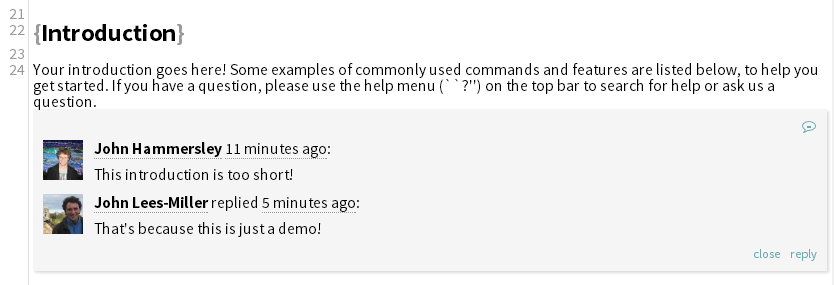
So if you’d like to use LaTeX to write your thesis but your supervisor balks at it, try introducing them to Overleaf’s rich text mode and commenting feature. They just might be convinced!
- Universiti Sains Malaysia thesis template
- Universiti Malaya thesis template
- Multimedia University thesis template
- Universiti Utara Malaysia thesis template
- University Kebangsaan Malaysia thesis template (English)
- University Kebangsaan Malaysia thesis template (Malay)
At some point I’ll probably get round to uploading the university-themed beamer templates, too. :-)
(A little more information about Overleaf after the divider and disclaimer)
(Disclaimer: I provide LaTeX-related community support for Overleaf — so you probably won’t want to just take my word for the following; go try it out yourself! :-)
Overleaf provides an online collaborative environment for authoring and publishing research using LaTeX. One nice thing about Overleaf is the rich text mode — which hides most LaTeX stuff from collaborators who are not familiar with it.
Another nice thing is the commenting facility.
So if you’d like to use LaTeX to write your thesis but your supervisor balks at it, try introducing them to Overleaf’s rich text mode and commenting feature. They just might be convinced!
Wednesday, November 26, 2014
umalayathesis Updated
Friday, September 26, 2014
My slides source codes for MOSC 2014 talks
I presented something on Android Kernel/ROM at the Malaysian Open Source Conference (MOSC) 2014. I did my presentation with beamer. Here are the slides and the source codes at Github
Source at github, here
Source at github, here
Thursday, September 18, 2014
IguanaTeX — a free, open-source LaTeX plugin for PowerPoint
(Reblogged from Jonathan Le Roux's G+ page)
Give it a spin!
Hi! If you are using PowerPoint on Windows and are looking for a convenient way to insert LaTeX equations, I'd like to suggest trying out IguanaTex, which I am now in charge of developing:
http://www.jonathanleroux.org/software/iguanatex/
It's a good and free alternative to the now apparently abandonned TexPoint.
The LaTeX displays created with IguanaTex support formatting (rotation, resizing, color fills, etc), animations, as well as inclusion in groups (even hierarchical): they can be edited while retaining all these properties.
I hope you like it.
Jonathan
Give it a spin!
Wednesday, June 4, 2014
LaTex & Thesis: FOUR good reasons.
During my degree in 2002, most of my assignments and the final year project report is done in Microsoft Word 97, a WYSIWYG type word processor. For a person first time using a computer (for official reason, other than Daytona USA, minesweeper and the dial-up type internet surfing :)), this what-you-see-is-what-you-get word processor is actually impressive for me on the things it can do, BUT I notice something, some patterns,
FOUR good reason I found to start using LaTex for my thesis.
ONE. Scalability - As I mentioned earlier - the size of your document. Word (or even Open Office) can get slower when editing large documents with equations and figures. In LaTex, I break my thesis into smaller chunks (like one chapter per file) and then let LaTex combine them altogether. This also lead to more organizable and manageable documents.
You should NOT use LaTex if,
- chances of my computer getting crashed is directly proportional to the importance of the document, for example - the chances of my computer getting crashed when I'm writing my report for the final year project is HIGHER compared to when I'm a writing a letter to ask permission for motorcycle sticker.
- chances of my computer getting crashed is inversely proportional to the time left for my deadline, for example - the chances of my computer getting crashed when I'm writing my report for the final year project when the deadline is tomorrow is HIGHER than the deadline 1 week ago.
Well this theory is not proven, this is my 'syok sendiri teori'. I noticed one thing in common in the patterns above is the size of the documents. My computer actually crashed (this is in 2002, currently in 2014 - it does not crash but it will run in slow motion :)) because it cannot handle the size of my file getting into. A computer crash commonly occurs when a hardware exception occurs that cannot be handled.
This waste my effort and time.
This waste my effort and time.
FOUR good reason I found to start using LaTex for my thesis.
ONE. Scalability - As I mentioned earlier - the size of your document. Word (or even Open Office) can get slower when editing large documents with equations and figures. In LaTex, I break my thesis into smaller chunks (like one chapter per file) and then let LaTex combine them altogether. This also lead to more organizable and manageable documents.
An interesting graph from Marko Pinteric showing the relation between document size and effort / time required.

TWO. Support - Excellent support from the web community, one such example is the Malaysian LaTex User Group blog. I can 'google' any matter related to LaTex and come up with a solution.
TWO. Support - Excellent support from the web community, one such example is the Malaysian LaTex User Group blog. I can 'google' any matter related to LaTex and come up with a solution.
Also local university thesis template is available in LaTex, thanks to good people that created and shared it for free. You can get it from here Malaysian University Thesis LaTex Template.
THREE. Interoperability - LaTex is OS independent. An actual LaTex file is merely a text file, which is just about the most portable format in computing. So I found no problem writing my Chapter 1 in a Fedora system and then shared it with my supervisor in a Windows system.
FOUR. Quality - This is my personal belief and maybe few others, I feel that documents produced using LaTex looks better and more professional compared to Word, especially if it involved mathematical equations and algorithms. I will let you to try and decide upon by yourself.
- You don't have time to learn it. - You' re reaching a deadline, you better stick with what you know first.
- Your document is already written - You had written your thesis in Word and need to submit in two days. Well my friend, I found no good reason to convert to LaTex and submit it.
Excellent write-up from external links.
Just google 'advantage and disadvantage of LaTex', you can find so many sources available out there.
Just google 'advantage and disadvantage of LaTex', you can find so many sources available out there.
- http://nitens.org/taraborelli/latex
- http://www.zinktypografie.nl/latex.php?lang=en
- http://openwetware.org/wiki/Word_vs._LaTeX
- and many more ...
As a conclusion, there is no winner whether its LaTex or Word (or other type of WYSIWYG editor).
If you need to write a short letter, you are best writing in Word. For simple documents, you can save time by writing in Word or Open Office.
If you are writing a long document like a Master or PhD thesis, I think it is better with LaTex. It will be slower at the beginning (the extra time required to learn LaTex), but at the end it will save a lot of your time and effort.
Thursday, May 8, 2014
Blackboard, DarkConsole and Moreblue Beamer Themes
These Beamer themes have been around quite a while, but I've just discovered them from some Japanese github sites.
The Blackboard theme may be useful for short talks with a little bit of fun:


I’ve a feeling that this DarkConsole theme would be popular with some developers.


And the Moreblue theme has a nice, airy feel about it:


The Blackboard theme may be useful for short talks with a little bit of fun:
\documentclass{beamer}
\usetheme{Blackboard}
\usetheme{Blackboard}
I’ve a feeling that this DarkConsole theme would be popular with some developers.
\documentclass{beamer}
\usetheme{DarkConsole}
\usetheme{DarkConsole}
And the Moreblue theme has a nice, airy feel about it:
\documentclass{beamer}
\usetheme{MoreblueLight}
\usetheme{MoreblueLight}
Monday, April 21, 2014
Subscribe to:
Posts (Atom)